

Running a business alone is exhausting. The admin work never ends. Emails keep coming. Social media needs content. Customers need replies. And you still need time to grow the business.
If you’ve been wondering what can virtual assistants do to help you breathe again. This guide will walk you through it.
A skilled VA can take over 80% of your repetitive workload so you can focus on strategy, revenue, and freedom.
What You’ll Learn
- The most valuable tasks to delegate to a virtual assistant
- Step-by-step guidance to delegate effectively
- A comparison of VA tasks vs your time value
- Real examples for small business owners and solo entrepreneurs
Why Delegating Matters
Most business owners don’t fail due to lack of skill… they fail due to lack of time. A virtual assistant gives you that time back.
Top 60 Tasks You Can Delegate to a Virtual Assistant
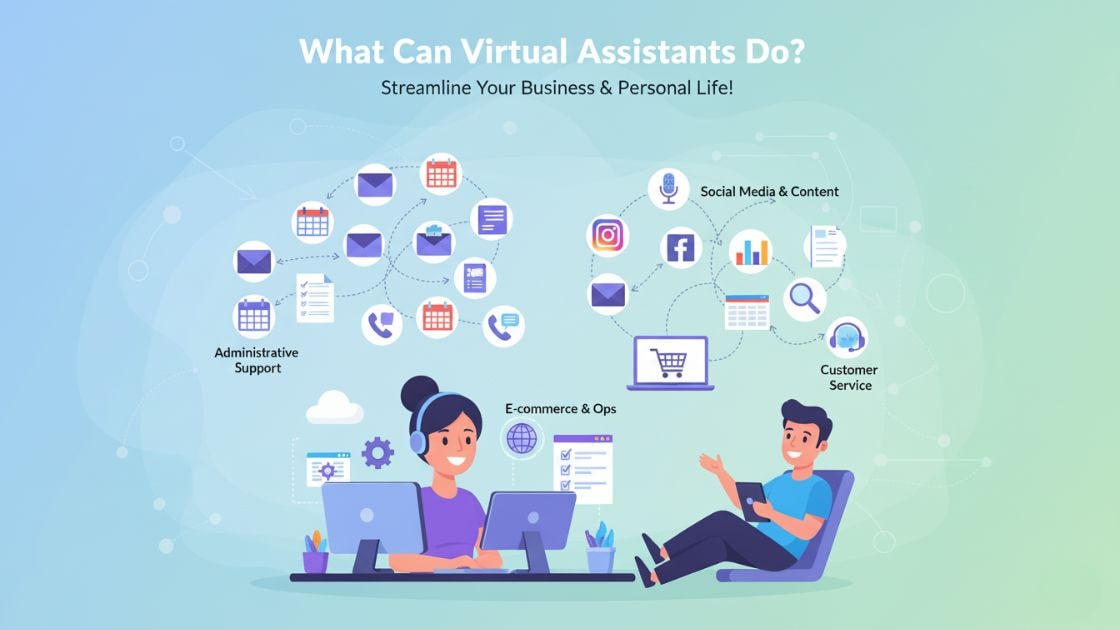
Here are the most impactful tasks to delegate to a virtual assistant, broken into clear categories.
1. Email Inbox Management
A virtual assistant can take full control of your inbox by sorting messages, archiving what’s irrelevant, and prioritizing the emails that actually need your attention. They can also draft replies, flag urgent threads, and keep you updated with a daily summary so you never miss an important message. Instead of spending hours drowning in emails, you get a clean, organized inbox every morning. This reduces stress and gives you clarity before the workday begins.
2. Calendar Scheduling
A VA ensures your calendar is always structured, updated, and free of conflicts. They confirm appointments, schedule calls, block focus time, and add reminders so you stay ahead of every commitment. You no longer waste energy coordinating meeting times or rescheduling last-minute changes. Everything runs smoothly while you focus on bigger priorities.
3. Customer Support Emails
A virtual assistant can handle the majority of your customer service emails using templates, FAQs, or brand guidelines. They respond quickly, maintain a friendly tone, and resolve issues before they escalate. This keeps your customers satisfied and reduces churn. You’ll have more time to focus on improving your product or service instead of answering the same questions all day.
4. Live Chat Support
Your VA can monitor your website’s live chat, answering questions the moment visitors arrive. This not only improves customer experience but increases conversion rates because prospects don’t have to wait. They can guide users, recommend products, or escalate issues when needed. Your website feels alive and responsive 24/7.
5. Data Entry & Cleanup
VAs can handle time-consuming data entry tasks such as updating spreadsheets, migrating information, or cleaning up outdated records. They ensure everything is accurate, neatly organized, and easy to navigate. Clean data helps you make better decisions and prevents embarrassing mistakes caused by outdated numbers. This is one of the easiest and most impactful tasks to delegate.
6. Appointment Booking
Your VA can take control of booking calls, demos, meetings, or consultations. They coordinate schedules, send confirmations, and follow up if someone needs to reschedule. This removes the back-and-forth hassle most business owners deal with daily. You’ll show up to every meeting prepared and stress-free.
7. Follow-Up Emails
Following up is one of the most important but neglected business tasks. A VA can send polite reminders, follow up on leads, and check in with prospects who expressed interest. These small touches can significantly increase your conversion rate. While you focus on strategy, your VA keeps conversations alive.
8. Social Media Scheduling
A VA can plan and schedule posts across multiple platforms using tools like Buffer or Meta Business Suite. This ensures your content goes out consistently even on busy days. They can also adjust schedules based on performance or peak engagement times. You appear active and reliable without doing the heavy lifting.
9. Social Media Engagement
Your VA responds to comments, inbox messages, and mentions so your audience feels seen and valued. Engagement builds trust and encourages more interactions with your brand. This also boosts the algorithm, helping your content reach more people. Having someone active in your DMs keeps the community alive.
10. Hashtag Research
A virtual assistant studies trending, niche, and evergreen hashtags to boost your reach on platforms like Instagram, TikTok, and LinkedIn. This makes your content more discoverable and increases engagement naturally. They test new hashtag sets and track performance. You don’t waste time guessing what works.
11. Basic Graphic Design
Using tools like Canva, a VA can design simple social media posts, flyers, banners, and thumbnails. They maintain brand consistency by following your color palette and fonts. This keeps your content looking professional even if you’re not a designer. You get more polished visuals without hiring a full design team.
12. Content Repurposing
Your VA can turn one piece of content into multiple formats blogs into tweets, videos into reels, reels into quotes, and more. This helps you stay active on every platform without creating new content from scratch. Repurposing makes your ideas last longer and reach wider audiences. A VA handles the transformation so you stay consistent effortlessly.
13. Blog Formatting
Even if you write your blog posts, a VA can format them for publishing, adding headings, links, spacing, images, and SEO elements. A well-formatted blog keeps readers engaged and improves search ranking. They ensure that every post looks polished and professional. You save time and publish faster.
14. Keyword Research (Basic)
A VA can find relevant keywords for your niche using simple tools or manual research. This helps you target better blog topics and optimize your content for search engines. They organize keywords into lists and clusters so you can plan content strategically. It’s a simple task with big SEO benefits.
15. Lead List Building
Your VA can identify potential customers based on industry, job title, location, or behavior. They create clean, accurate lists for outreach so your sales efforts are more targeted. With the right leads, your conversion chances increase dramatically. This steady pipeline of prospects strengthens your business growth.
16. CRM Management
VAs update contacts, log calls, add notes, and move leads between stages in your CRM. They ensure nothing falls through the cracks. A clean CRM improves your follow-ups and tracking accuracy. This keeps your sales process organized and efficient.
17. Cold Email Outreach
Your VA sends personalized outreach emails to prospects following templates or scripts. Their job is to increase your visibility and generate new opportunities. They can track open rates, replies, and follow-up sequences. You get more leads without spending hours sending emails.
18. Warm Lead Nurturing
Not all leads convert immediately. A VA can manage nurturing sequences, send updates, and check in at the right moments. This builds relationships and keeps your brand top-of-mind. Warm leads convert better when they feel valued and informed.
19. Online Research
Whether you need competitor insights, software comparisons, or industry trends, a VA can gather and organize detailed research. They save you hours of scrolling and reading. You receive clear summaries that support smarter decisions. It’s like having a personal researcher.
20. Market Research Summaries
Your VA can turn complex market data into simple, actionable summaries. These help you understand trends, demands, and opportunities without digging through lengthy reports. You get clarity fast, enabling better decision-making. Research becomes easy to digest and use.
21. Travel Planning
A VA can research flights, compare hotels, look for the best prices, and organize your entire travel itinerary. They can also book seats, schedule airport transfers, and make sure you have confirmations for everything in one place. This saves hours of planning and avoids the stress of last-minute arrangements. You simply approve the plan, pack your bags, and enjoy the trip.
22. Event Coordination
Virtual assistants help organize webinars, conferences, online workshops, or even internal company events. They manage invitations, send reminders, coordinate speakers, and prepare event materials so everything runs smoothly. They can also handle post-event surveys and follow-ups. You stay focused on hosting, while your VA makes sure the details are perfect.
23. Expense Tracking
Your VA can collect receipts, organize expenses, categorize spending, and prepare reports for your accountant. This eliminates the end-of-month chaos many business owners experience. With clear tracking, you always know where your money is going. This makes budgeting easier and helps you avoid unnecessary financial mistakes.
24. Invoice Creation
A VA prepares invoices, sends them on time, and tracks which ones have been paid. They follow your branding and ensure accuracy in every document. This makes your business look more professional and reduces delays in payment. You get faster cash flow without handling manual paperwork.
25. Payment Follow-Up
Your VA can send polite reminders to clients with overdue invoices. Many business owners feel uncomfortable doing this, but a VA keeps it friendly and consistent. This improves your collection rate and ensures smoother financial operations. You get paid without awkward conversations.
26. Online Store Management
If you run an e-commerce store, a VA can update products, pricing, tags, and descriptions. They ensure your listings are accurate, consistent, and optimized for shoppers. A well-managed store leads to better customer experience and fewer refunds. You can focus on sales while your VA handles the backend.
27. Order Processing
Your assistant tracks incoming orders, updates customers on shipping status, and coordinates with fulfillment teams. This ensures every order goes out smoothly and on time. Customers feel more confident when they receive regular updates. You won’t have to monitor every small detail.
28. Return & Refund Handling
A VA can manage return requests, check eligibility, and guide customers through the refund process. They maintain a professional and helpful tone, even in difficult situations. A smooth return experience builds trust and protects your brand’s reputation. You avoid stress and keep your customers happy.
29. Customer Review Collection
Your VA asks satisfied customers for reviews, sends follow-up messages, and organizes feedback. Positive reviews help boost trust and boost your ranking online. They also create opportunities for testimonials and case studies. This strengthens your brand’s social proof effortlessly.
30. Creating SOPs (Standard Operating Procedures)
A VA can document all your processes into clear steps, checklists, and guidelines. This makes your business easier to scale because tasks can be repeated consistently. SOPs also help when onboarding new team members. You create a more organized and predictable business system.
31. File Organization & Cloud Management
A VA organizes your Google Drive, Dropbox, or OneDrive folders so everything is neat and easy to find. They eliminate duplicate files, rename items properly, and structure everything logically. Instead of wasting time looking for documents, you access everything instantly. Your digital workspace becomes clean and efficient.
32. Presentation Creation
Your VA can create polished, professional PowerPoints or Google Slides for meetings, pitches, or webinars. They follow your brand style and organize content in a clear, engaging way. This saves you from spending hours designing slides. You show up prepared and confident.
33. Podcast Management
A VA uploads episodes, writes show notes, timestamps sections, and prepares titles and descriptions. They also schedule posts and share the episode across platforms. This helps you maintain consistent publishing without doing the technical work yourself. You focus on recording content, and your VA handles the rest.
34. YouTube Upload Management
Your assistant uploads videos, writes SEO-friendly descriptions, adds tags, creates thumbnails, and schedules posts. This ensures your channel stays active and optimized for search. YouTube growth becomes easier when you’re not doing everything alone. Your VA makes consistency effortless.
35. Online Community Management
Whether you have a Facebook Group, Discord server, or online membership, a VA can moderate comments, approve members, and answer questions. They keep the community active and safe. This builds loyalty and boosts engagement. Your group grows without requiring your constant presence.
36. Email Newsletter Creation
Your VA drafts, formats, and schedules newsletters using platforms like Mailchimp, Klaviyo, or ConvertKit. They prepare templates, add images, organize content, and make sure everything looks clean and professional. Regular newsletters improve customer engagement and build long-term trust. You stay connected to your audience without doing all the writing and formatting yourself.
37. Basic Email Automation Setup
A VA can create simple automated sequences, such as welcome emails, onboarding flows, or lead nurturing messages. These sequences run on autopilot, helping you deliver consistent communication. Automations improve customer experience and increase conversions. Once set up, they work 24/7 without your manual involvement.
38. Landing Page Updates
Your VA can update copy, images, buttons, and layout on landing pages using builders like WordPress, Wix, or Webflow. They make sure pages stay current with new offers or promotions. A fresh, optimized landing page helps boost conversions. You don’t need to touch the tech side at all.
39. Blog Post Publishing
Even if you write the content, a VA handles formatting, SEO optimization, image placement, internal linking, and scheduling. This ensures your blogs look professional and perform well in search engines. You save hours of tedious backend work. Your blog becomes consistent and high-quality.
40. Competitor Analysis
Your VA researches competitors, reviews their content, pricing, offers, and user experience. They provide summaries that help you understand what others are doing. This gives you insights to improve your own strategy. Competitive intelligence becomes much easier when someone else gathers the data.
41. Recruitment Assistance
A VA screens resumes, shortlists candidates, schedules interviews, and organizes applications. They track applicants and keep your hiring pipeline updated. This is extremely helpful for businesses hiring frequently. You save time while still maintaining a smooth recruitment process.
42. Job Posting Management
Your assistant writes, uploads, and manages job postings across multiple job boards. They ensure listings are clear, accurate, and attractive to candidates. A well-written job post leads to better applicants. Your hiring process starts strong right from the first step.
43. Onboarding Assistance
A VA prepares onboarding documents, welcome emails, and training materials for new hires. They help new employees feel supported from day one. This makes your team more organized and improves retention. You set a professional tone without spending hours managing details.
44. Canva Template Creation
Your VA creates reusable templates for social media, proposals, or presentations. Templates save you time and maintain brand consistency. Once created, you or your VA can reuse them endlessly. This makes your content production faster and more professional.
45. Personal Reminders & Task Lists
A VA can organize your daily to-do lists, set reminders, and ensure you stay focused on the right priorities. They help you avoid missing deadlines or forgetting important commitments. This support keeps your productivity high. It’s like having a personal assistant who keeps your mind clear.
46. Online Course Setup & Management
Your VA uploads lessons, organizes course modules, adds worksheets, and manages student communication. They ensure everything is well-structured and easy to navigate. Course creators save countless hours on backend tasks. Students enjoy a smooth learning experience.
47. Membership Website Support
If you run a membership platform, your VA handles new member access, cancellations, support messages, and content updates. This reduces churn and improves the user experience. Members stay engaged and supported. Your community runs smoothly with minimal effort from you.
48. Sales Reports & Analytics
A VA compiles sales numbers, customer trends, and performance metrics into easy-to-read reports. Regular reporting gives you clarity on what’s working and what needs improvement. You can focus on strategy while your VA handles the data. This helps you make decisions backed by insights.
49. Customer Onboarding Emails
Your VA manages welcome emails, tutorials, and onboarding steps for new customers. A smooth onboarding experience increases customer satisfaction and reduces refund requests. It also makes clients feel more confident about using your product or service. Your VA ensures everyone starts on the right foot.
50. Document Creation
VAs prepare proposals, contracts, checklists, templates, and PDF guides. These materials make your business look more polished and organized. You get professional documents without spending hours formatting them yourself. This improves branding and communication.
51. Personal Shopping Assistance
Your VA can search for products, compare prices, read reviews, and make recommendations. They can even place orders for you once you approve. This saves time and ensures you always get the best deals. Personal shopping becomes effortless.
52. Gift Research & Coordination
Whether it’s client gifts, employee appreciation, or special occasions, a VA can handle everything from research to delivery. They help you choose thoughtful options based on your preferences and budget. Personal touches like these build stronger relationships. You stay memorable without any of the workload.
53. Calendar Coordination Across Teams
If you manage a team, a VA can coordinate everyone’s schedules, book group meetings, and adjust calendars when availability changes. This prevents time conflicts and improves productivity. Your team stays organized without dozens of Slack messages. It creates smoother workflow for everyone.
54. Simple Bookkeeping Support
Your VA organizes transactions, categorizes expenses, and keeps financial documents updated. They aren’t accountants, but they prepare everything so your CPA’s job becomes easier and faster. This also reduces end-of-month stress. Your books stay clean and ready for review.
55. Performance Dashboards
A VA can build simple dashboards in Google Sheets or Excel to track KPIs like sales, marketing performance, and customer metrics. These dashboards give you quick access to important numbers. You get more visibility into your business without manually updating spreadsheets. Decision-making becomes easier.
56. Transcription Services
Your VA converts audio files, meetings, or video recordings into organized written text. This is helpful for content creation, podcasts, training materials, and documentation. Transcriptions save time and make content easier to repurpose. You can search and review information without replaying audio.
57. Document Proofreading
A VA checks emails, proposals, blogs, and presentations for grammar mistakes, spelling issues, and formatting errors. They ensure everything you send or publish looks clean and professional. This protects your brand reputation and improves communication clarity. You avoid embarrassing errors.
58. Customer Loyalty Management
Your VA tracks repeat customers, sends thank-you messages, manages reward programs, and identifies VIP clients. These small touches significantly improve customer retention. A loyal customer brings more revenue than a new one. Your VA helps strengthen long-term relationships.
59. Managing Online Tools & Software
Your VA keeps track of your software accounts, renewals, subscriptions, and login details. They also research and recommend tools to improve efficiency. This keeps your tech stack organized and prevents surprise billing issues. You stay in control without micromanaging every app.
60. Personal Admin Work
Your VA can help organize personal tasks such as booking appointments, managing household calendars, researching services, or handling paperwork. This reduces mental load so you can focus on business growth. A balanced personal life increases productivity and clarity. A VA becomes an extension of your support system.
Step-by-Step Guide: How to Delegate to a VA
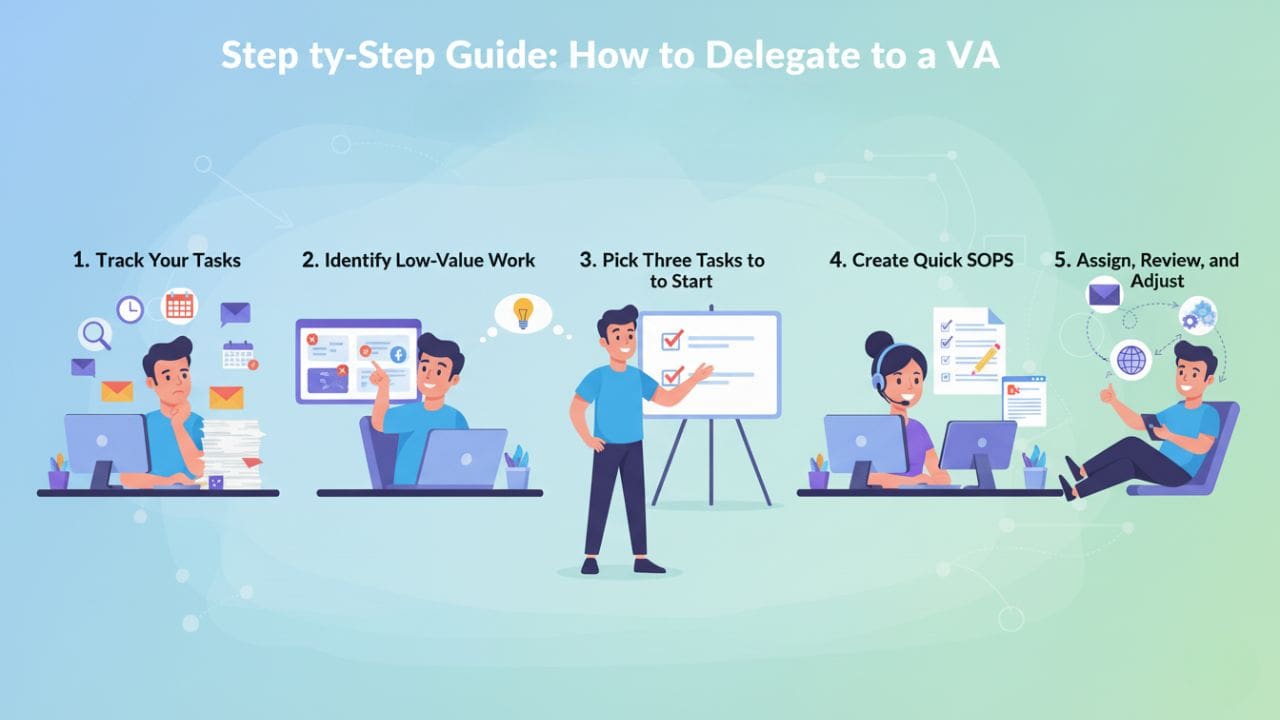
Step 1: Track Your Tasks
For one full day, write down every single task you do even the tiny ones that take only a minute. This helps you see exactly where your time goes and reveals hidden patterns you might not notice. Most business owners underestimate how much energy small admin tasks drain from them. By capturing everything in real time, you get a realistic picture of what you should keep doing, and what can easily be handed off to a virtual assistant. This becomes the foundation of effective delegation.
Step 2: Identify Low-Value Work
Once you have your task list, go through it and ask two simple questions: “Does this grow my revenue?” and “Does this actually require my expertise?” If the answer is no to both, it’s a low-value task that you should delegate. These are usually repetitive, administrative, or routine actions that eat up your mental bandwidth. Delegating them frees your time for higher-level work. The things that move the business forward. This step helps you separate CEO-level tasks from tasks that someone else can easily do.
Step 3: Pick Three Tasks to Start
Instead of trying to delegate everything at once, choose just three tasks to begin with. The best starters are email management, calendar management, and social media scheduling because they drain time but don’t require your personal involvement. Delegating only a few tasks in the beginning helps you build confidence and reduces overwhelm. As your VA learns your style and you get more comfortable letting go, you can gradually delegate more. Starting small sets you up for long-term success.
Step 4: Create Quick SOPs
You don’t need long, complicated training manuals to delegate effectively. Simple Standard Operating Procedures (SOPs) work perfectly screen recordings, voice notes, or bullet points explaining how you like things done. This gives your VA clarity and reduces mistakes. You also avoid answering the same questions repeatedly. SOPs are assets that grow with your business and make delegation faster each time you bring a new assistant onboard.
Step 5: Assign, Review, and Adjust
Give your VA the task, let them complete it, and then review the results. Weekly check-ins allow you to refine instructions and make small tweaks that improve accuracy over time. Delegation is a skill and it gets better with practice from both sides. As your VA becomes familiar with your preferences, work quality improves naturally. Over time, the tasks you delegate become effortless and automatic, freeing more of your time each week.
Comparison Table: Should You Do It or Delegate?
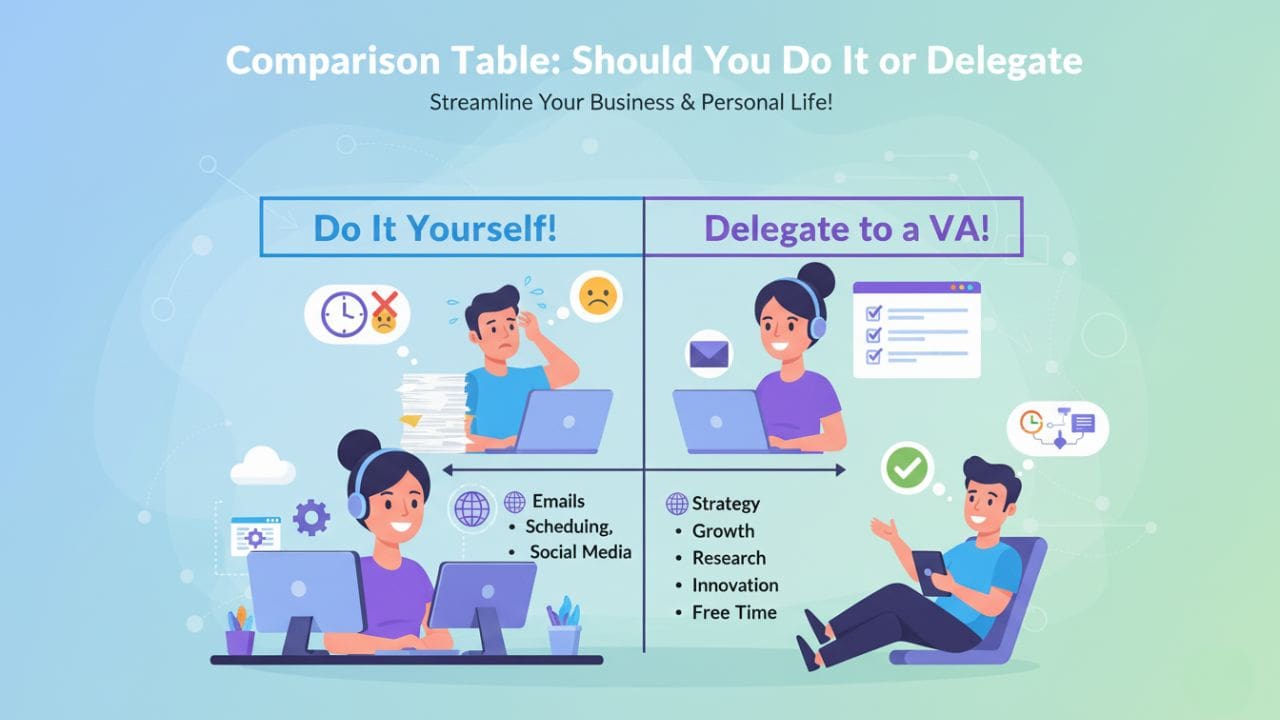
| Task | Your Time Cost | VA Cost | Best Action |
|---|---|---|---|
| Email Management | 2–3 hours/day | 1 hour/day | Delegate |
| Social Media Scheduling | 5 hours/week | 2 hours/week | Delegate |
| Lead Follow-Up | Low priority | High consistency | Delegate |
| Strategy & Decision-Making | High value | Not suitable | Do it yourself |
Think of it this way:
If your time is worth $50/hour, and a VA charges $10–$15/hour, delegation pays for itself instantly.
Conclusion
Hiring a virtual assistant isn’t just about outsourcing tasks.
It’s about taking back time, reducing stress, and focusing on what actually grows your business.
Now that you know what virtual assistants can do, you’re ready to shift your workload and operate at a higher level.

If you need a reliable, trained VA for your business REMMS is here to support you.
Ready to Grow Your Small Business?
If you’re tired of doing everything yourself and you’re ready to scale your business without stress, it’s the perfect time to hire a VA.
Book a Free Consultation